
Your Electronics May Look Fine Right Now. That’s The Problem.
The scary thing about monsoon damage is that it rarely announces itself.
Your laptop still turns on.
Your television still works.
Your gaming console still looks brand new.
Everything seems normal.
Until one day…
The screen flickers.
The sound becomes distorted.
The battery starts behaving strangely.
The device suddenly stops working.
And you’re left wondering:
What happened?
Most people blame age.
Some blame the manufacturer.
But during monsoon, there’s another culprit quietly working in the background.
Humidity.
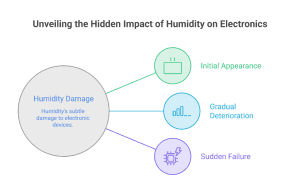
And unlike a cracked screen or a visible scratch, humidity damage often starts long before you notice it.
The Real Threat Isn’t Rain. It’s The Air.
When people think about protecting electronics during monsoon, they focus on water.
Keeping devices away from windows.
Avoiding spills.
Protecting gadgets from rain.
Those things matter.
But the bigger threat is often invisible.
Humidity.
During monsoon, moisture levels in the air rise dramatically.
And that moisture finds its way into places you never expect.
Including the devices you use every day.
That’s why understanding electronics storage, humidity control storage, and monsoon home protection is becoming increasingly important.
How Humidity Sneaks into Your Devices
Here’s what most people don’t realize.
Electronics are not completely sealed.
Laptops have vents.
Televisions have openings.
Gaming consoles need airflow.
Desktop computers rely on cooling systems.
This means moisture in the air can gradually enter internal components.
Not enough to create immediate problems.
But enough to create long-term risks.
And that’s where trouble begins.
Why Monsoon Humidity Damage Is So Difficult to Spot
If a device falls, you see the damage.
If a screen cracks, you see the damage.
Humidity doesn’t work like that.
It builds slowly.
Quietly.
Patiently.
Week after week.
Month after month.
Which is why many people never connect device failures to humidity exposure.
The damage often appears long after the rainy season has passed.
The Devices Most Vulnerable During Monsoon
Not all electronics react the same way.
Some are far more sensitive to moisture.
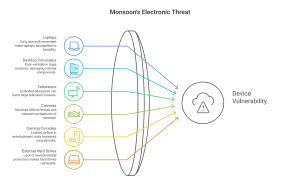
Laptops
Often used daily and moved between different environments.
A common victim of monsoon humidity.
Desktop Computers
Internal components can collect moisture over time.
Especially in poorly ventilated rooms.
Televisions
Large screens are particularly vulnerable when exposed to damp conditions for extended periods.
Cameras
One of the most sensitive electronic devices during monsoon.
Moisture can affect both lenses and internal mechanisms.
Gaming Consoles
Often stored in entertainment units where airflow is limited.
External Hard Drives
Many people store years of memories on these devices.
Yet they rarely think about environmental protection.
The Warning Signs Most People Ignore
Humidity damage rarely appears all at once.
Look out for:
- unusual heating
- slower performance
- battery issues
- strange noises
- display problems
- connectivity failures
These small symptoms often appear before larger failures.
Why Storage Matters More During Monsoon
Here’s something interesting.
Many electronics are damaged while they’re not even being used.
Old laptops.
Spare monitors.
Backup devices.
Unused speakers.
Stored gadgets are often more vulnerable because nobody checks them regularly.
This is where proper electronics storage becomes essential.
Because devices that sit untouched for months can silently accumulate moisture damage.
The Mistake Most Households Make
The common assumption is:
It’s indoors, so it’s safe.
Unfortunately, indoor humidity can be just as problematic.
Especially in:
- wardrobes
- cupboards
- storage rooms
- under-bed storage spaces
These locations often trap moisture.
Which creates the exact environment electronics dislike.
Monsoon Storage Tips For Electronics
Protecting devices doesn’t have to be complicated.
Start with a few simple habits.
Keep Devices Clean
Dust and moisture together create bigger problems than either one alone.
Avoid Floor-Level Storage
Moisture tends to collect near floors and walls.
Improve Airflow
Electronics need ventilation.
Storage spaces do too.
Check Stored Devices Periodically
Don’t wait a year before opening that storage box.
Consider Climate-Controlled Storage For Valuable Equipment
Especially for:
- cameras
- audio equipment
- gaming collections
- business electronics
Stable environments help reduce long-term risk.
Why Businesses Need to Think About This Too
This isn’t just a household problem.
Businesses often store:
- servers
- backup systems
- monitors
- networking equipment
- archived devices
And these assets are often worth far more than people realize.
That’s why safe device storage and humidity control storage matter for businesses as much as homes.
The Cost of Replacing Electronics Is Rising
A damaged chair can sometimes be repaired.
A damaged wardrobe can sometimes be restored.
Electronics are different.
Once internal components fail, replacement often becomes the only practical option.
Which makes prevention far more affordable than repair.
The Monsoon Electronics Audit
Take five minutes today.
Look around your home.
Ask yourself:
Which electronics am I not using regularly?
Where are they stored?
Is that space prone to humidity?
Would I notice damage before it became serious?
Most people are surprised by the answers.
The Best Monsoon Protection Is Awareness
The goal isn’t to panic every rainy season.
It’s simply to be aware.
Because the biggest risk isn’t rain.
It’s forgetting that humidity exists.
And by the time many people notice the damage…
The rainy season is already over.
Before Monsoon Humidity Affects Your Devices, Read This
Can humidity damage electronics even if they never get wet?
Yes. Moisture in the air can affect internal components over time.
Which devices are most vulnerable during monsoon?
Laptops, cameras, gaming consoles, televisions, desktop computers, and external storage devices.
What is humidity control storage?
Humidity control storage helps protect sensitive items by reducing exposure to excessive moisture.
Is storing electronics in a wardrobe safe?
Not always. Closed wardrobes can trap humidity during monsoon.
How can I protect electronics during the rainy season?
Improve ventilation, avoid damp storage areas, inspect devices regularly, and consider climate-controlled environments for valuable equipment.
Don’t Wait Until Your Devices Start Acting Strange
Humidity damage is easiest to prevent before it starts.
Protect your valuable electronics before the monsoon leaves a permanent mark.
Call us: +91 8433925040
